
爱意满满的作品展示区。
xiaoluoboding

分享一个🪀玩具项目,一个将 URL 转化为 SVG 版本的可视化 Web Bookmark Card 的服务,可用于在 GitHub README.md 中渲染

  •  
  •   xiaoluoboding ·
    xiaoluoboding · Oct 18, 2022 · 3384 views
    This topic created in 1317 days ago, the information mentioned may be changed or developed.

    在 GitHub README.md 中渲染 Web Bookmark Card
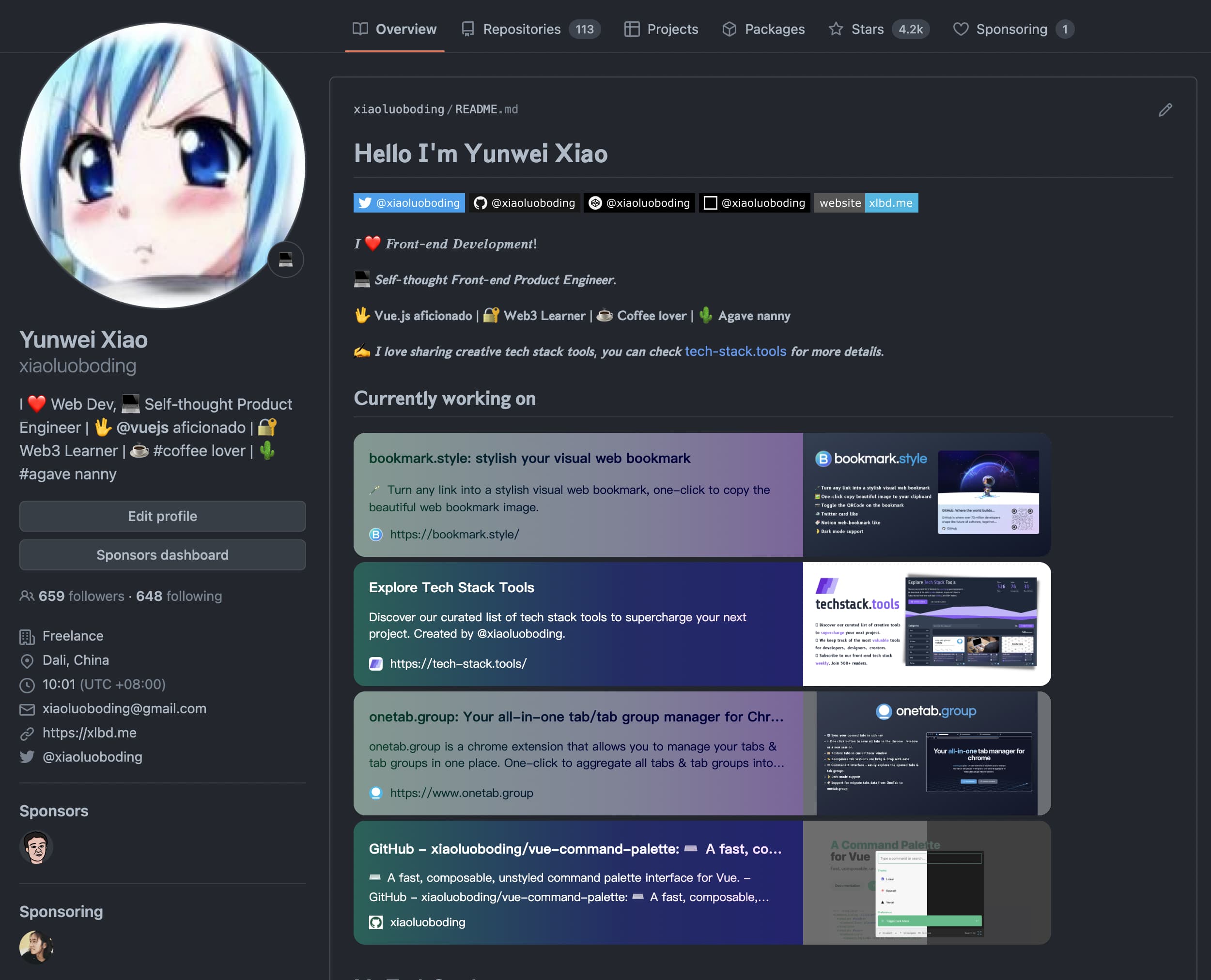
    类似我的 GitHub Profile README.md 中展示的,将一个链接转化为 Web Bookmark Card

    渲染 SVG 服务

    idea 源于社区童鞋的一个 issue

    简单点说就是输入一个链接得到一个渲染好的 SVG 图像。

    输入

    https://svg.bookmark.style/api?url=https://bookmark.style&mode=light
    

    生成
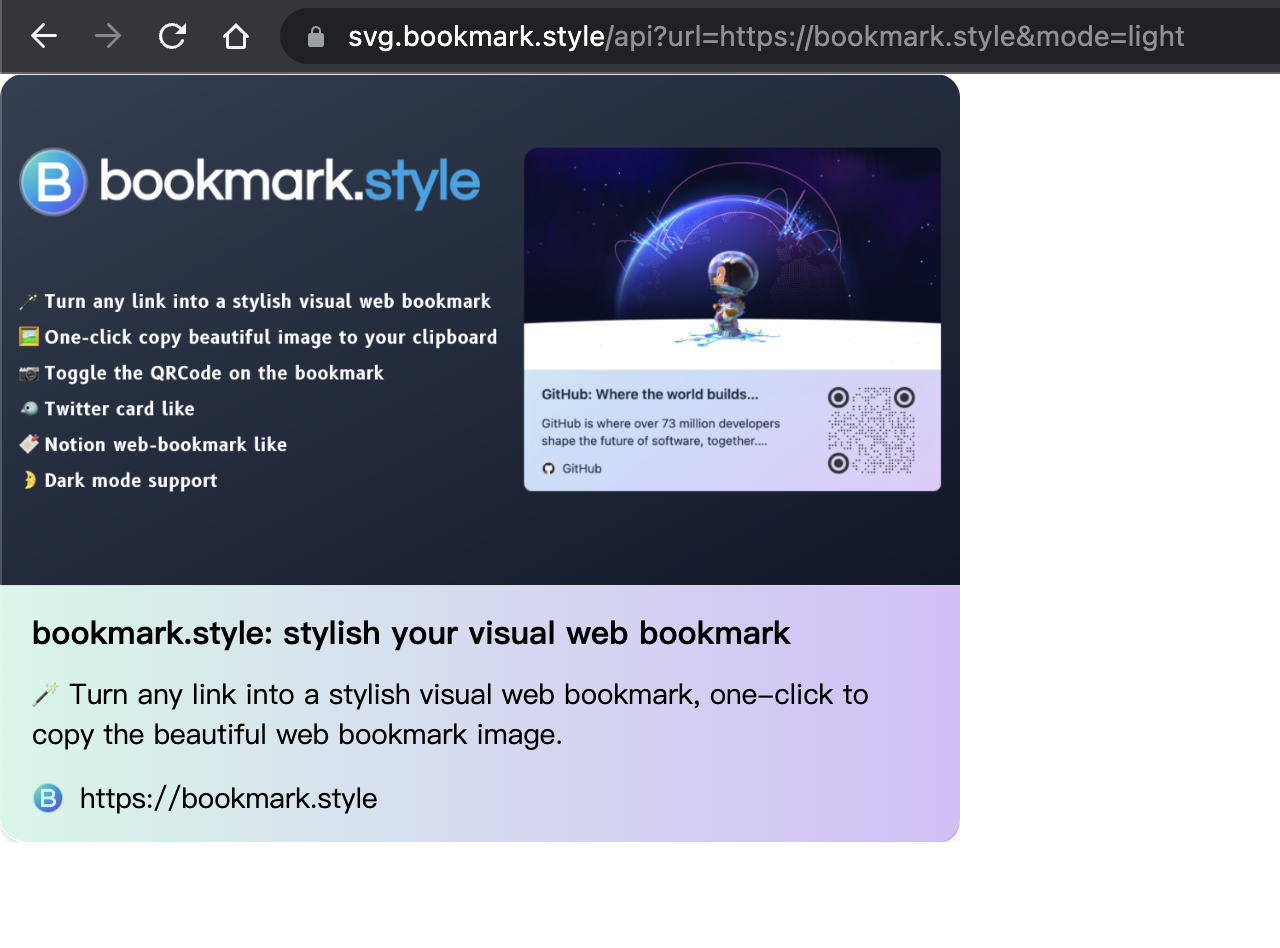
    README.md 中渲染

    在 GitHub 中的 README.md 是可以渲染 SVG 的,所以你可以把它作为一种展示手法放在 README.md 中,加强对链接的展现。

    代码

    拷贝如下代码到你的 README.md 中,即可展示一个渲染好的可视化 Web Bookmark

    [![bookmark.style]( https://svg.bookmark.style/api?url=https://bookmark.style&mode=light)]( https://bookmark.style)
    

    支持 light/dark 模式

    API

    https://svg.bookmark.style/api?url=<URL>&mode=<light|dark>)
    

    范例

    https://svg.bookmark.style/api?url=https://bookmark.style&mode=light
    

    支持自定义渐变颜色

    URL 中的十六进制颜色不能包含 # 字符,所以你可以像这样写 #000000 -> 000000

    Types

    type GradidentColor = {
      formColor: string
      viaColor?: string
      toColor: string
    }
    

    API

    https://svg.bookmark.style/api?url=<URL>&fromColor=<FROM_COLOR>&viaColor=<TO_COLOR>&toColor=<TO_COLOR>)
    

    范例

    # without viaColor
    https://svg.bookmark.style/api?url=https://bookmark.style&fromColor=f4a&toColor=4fa
    # or with viaColor
    https://svg.bookmark.style/api?url=https://bookmark.style&fromColor=f4a&viaColor=a4f&toColor=4fa
    

    支持两种展示风格 Twitter/Notion

    定义了 style 参数,vertical 代表 Twitter Like ,horizontal 代表 Notion Like

    API

    https://svg.bookmark.style/api?url=<URL>&style=<vertical|horizontal>)
    

    范例

    https://svg.bookmark.style/api?url=https://bookmark.style&style=vertical
    

    参考

    13 replies    2022-10-21 10:36:01 +08:00
    SingeeKing
        1
    SingeeKing  
    PRO
       Oct 18, 2022
    用我的博客试了下直接 500 了🌚

    https://svg.bookmark.style/api?url=https://blog.singee.site&mode=light
    SingeeKing
        2
    SingeeKing  
    PRO
       Oct 18, 2022
    哦我知道了,是因为我输错域名不存在导致的 500
    kokdemo
        3
    kokdemo  
       Oct 18, 2022
    有点酷啊这个,在哪可以点 star ?
    styang
        4
    styang  
       Oct 18, 2022
    挺有意思的
    ZxBing0066
        5
    ZxBing0066  
       Oct 18, 2022
    厉害了,不过好多地址会 500 😂
    hiugo
        6
    hiugo  
       Oct 18, 2022
    大佬能适配一下 bilibili 的简介吗现在的 bilibili 样式有点丑(((


    ![Bookmark Style Card]( https://svg.bookmark.style/api?url=https://www.bilibili.com/video/BV1G24y1d7ih&style=horizontal)
    xiaoluoboding
        7
    xiaoluoboding  
    OP
       Oct 18, 2022
    @ZxBing0066 #5 好多地址不支持跨域可咋整
    ZxBing0066
        8
    ZxBing0066  
       Oct 18, 2022
    @xiaoluoboding 啊 我看报错信息不是 serverless 抓取页面信息渲染的吗,为啥会遇到跨域问题。
    missdeer
        9
    missdeer  
       Oct 19, 2022
    This Serverless Function has crashed.

    Your connection is working correctly.

    Vercel is working correctly.

    500: INTERNAL_SERVER_ERROR Code: FUNCTION_INVOCATION_FAILED ID: sfo1::86cbp-1666141332728-f1ab9a6d41a3

    If you are a visitor, contact the website owner or try again later.
    If you are the owner, learn how to fix the error and check the logs.
    zhw2590582
        10
    zhw2590582  
       Oct 19, 2022
    既然是服务器抓取,怎么会有跨域问题呢
    bbis
        11
    bbis  
       Oct 19, 2022
    非常有用的项目,我的想法是,可以更改 SVG 的显示尺寸,可以做成一个实时更新的滚动新闻条
    isaced
        12
    isaced  
       Oct 19, 2022
    感觉有点类似 Vercel 前两天发的 [OG Image Generation]( https://vercel.com/blog/introducing-vercel-og-image-generation-fast-dynamic-social-card-images)
    wsph123
        13
    wsph123  
       Oct 21, 2022
    看起来很有用,就是尝试了一下却一直在报 500 错误 😭
    About   ·   Help   ·   Advertise   ·   Blog   ·   API   ·   FAQ   ·   Solana   ·   3155 Online   Highest 6679   ·     Select Language
    创意工作者们的社区
    World is powered by solitude
    VERSION: 3.9.8.5 · 107ms · UTC 12:43 · PVG 20:43 · LAX 05:43 · JFK 08:43
    ♥ Do have faith in what you're doing.